What are board meeting minutes?
Board meeting minutes are the official written record of what happened during a board meeting. A board secretary or another designated person usually takes them during the meeting, and they become part of your organization’s permanent records.
Minutes are not just paperwork. They are your board’s formal record of what was discussed, what was decided, and who voted which way. Board members, new and long-serving alike, rely on this record more than they might expect. This matters for three reasons:
- They protect your organization legally. If a decision is ever questioned, minutes are the evidence of how and why your board reached it.
- They create continuity between meetings. New directors, auditors, or lawyers can look back at minutes to understand past decisions without asking around.
- They set the standard for future meetings. Consistent, well-kept minutes make every future meeting easier to prepare for and record.
In short, board meeting minutes are a legal record. That is exactly why Canadian corporate law has specific requirements for keeping them, which we cover next.
Are board meeting minutes legally required in Canada?
Yes. If your organization is incorporated under the Canada Business Corporations Act (CBCA) or the Canada Not-for-profit Corporations Act (CNCA), keeping minutes of your board meetings is a statutory duty. This applies regardless of your board size, whether you are a small nonprofit or a large corporation.
Here is what the law actually says:
- Minutes must exist. Both the CBCA and the CNCA require corporations to prepare and maintain records containing the minutes of directors’ meetings, along with any resolutions the board of directors adopts.
- Minutes must be kept somewhere specific. Where you store minutes matters as much as how you write them: these records must be kept at your registered office or at another location in Canada that your directors designate. You cannot simply keep them on a personal laptop with no fixed location.
- Retention periods apply. Financial and accounting records generally need to be kept for six years, but corporate lawyers commonly advise boards to retain minutes indefinitely, since a missing record can create real problems during a share sale, audit, or dispute.
If you run a nonprofit or charity, treat your board meeting minutes as permanent records on top of these statutory requirements. Funders, auditors, and the Canada Revenue Agency may ask to see historical minutes years after a decision was made, so “eventually delete” is not a safe policy. It is also worth checking your organization’s bylaws directly, since some boards set retention or approval rules that go beyond the statutory minimum.
This is also why the board secretary role matters so much: someone needs clear responsibility for taking minutes, storing them at the designated location, and getting previous minutes approved rather than left as permanent drafts. Without that ownership, organizations often discover gaps in their minute book only when a lawyer or auditor asks to see it.
Read more: Credit unions carry an extra layer of governance expectations on top of the CBCA and CNCA basics covered here. Our guide on meeting minutes requirements for Canadian credit unions walks through what applies specifically to that sector.
What to include in board meeting minutes
Good minutes stick to facts, not commentary. The key points at a minimum should include the following:
This last point deserves more explanation. For routine motions, recording that a motion “carried unanimously” is enough. For anything contested, note the vote count and who voted for, against, or abstained. This level of detail protects individual directors as much as it protects the organization.
What not to include in board meeting minutes
Just as important as what you write down is what you leave out. Avoid:
- Every detail discussed, word for word
- Personal comments or opinions
- Words of praise
- Adjectives that editorialize on tone or quality
- Sloppy or unclear writing
- Implicit judgments about who said what
Minutes should record what was decided, not what was said. If your board debated a motion for 45 minutes, the minutes need to capture that the motion was raised, discussed, and voted on, not a transcript of the argument.
Open (public) vs. closed (in-camera) session minutes
Not every part of a board meeting belongs in the same set of minutes. Most boards split their meetings into two types of sessions:
For in-camera sessions, many boards keep the record deliberately brief: a note that the board moved into closed session, the general topic category (for example, “personnel matter”), and the time it returned to open session. This protects confidentiality while still documenting that the discussion took place.
How to take minutes at a board meeting: Step by step
Taking good minutes is easier when you break the job of recording board meeting minutes into three phases: before, during, and after the meeting.
Before the meeting
- Build your minutes template directly from the meeting agenda, so you already know which sections and motions to expect.
- Confirm who your note taker will be. This should not be the board president or chair, since they need to focus on running the meeting.
- Have a sign-in sheet or attendee list ready to confirm quorum quickly.
During the meeting
- Record attendance, arrival and departure times, and whether quorum was met at the start.
- Capture each motion as it happens: who moved it, who seconded it, and the vote outcome, so you are not relying on memory afterward.
- Note action items and follow-up tasks, along with who is responsible for them, as soon as they come up, rather than waiting until the end of the meeting.
After the meeting
- Draft meeting minutes while the discussion is still fresh, ideally within a day or two.
- Circulate the draft to the chair or relevant directors for review before the next board meeting.
- Get the minutes formally approved, typically at the start of the following board meeting, and store the final version securely.
Handwritten notes that get typed up days later are the biggest source of inaccurate minutes. A board portal that lets you build the agenda, capture motions live, and store the finished record in one secure place removes most of this risk.
Board meeting minutes template
Planning your minutes around your meeting agenda makes the whole process faster. You can use your agenda as the backbone of your board meeting minutes template, filling in each section as items come up. This same structure works as a general minutes-of-meeting template, whether your board uses it for a full board meeting or a smaller committee session.
If your board is still working from printed agendas and binders, going paperless with board meeting minutes is usually the easiest first step toward a faster, more accurate process.
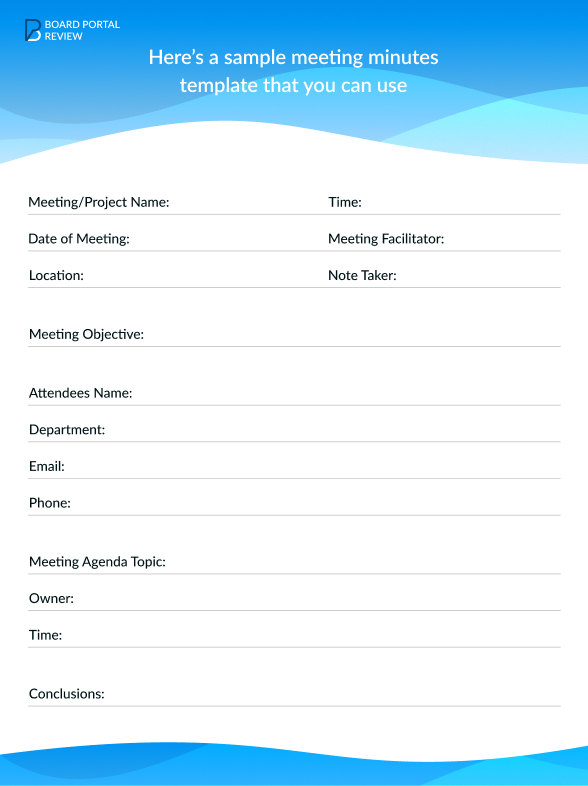
Here’s a blank template you can use:
Sample board meeting minutes
A blank template only tells you the structure. If you have been searching for a meeting minutes example that shows a finished, filled-in set rather than an empty form, the board meeting minutes sample below covers exactly that.
Disclaimer: The organization, names, and details below are entirely fictional and used for illustration only.
Notice what this sample does: it records what was decided and how each vote went, without editorializing on the discussion itself. That is the balance every set of board meeting minutes should strike.
Common mistakes to avoid
Beyond what to include and exclude in the text itself, boards commonly run into process mistakes that undermine otherwise solid minutes:
- Failing to record quorum. If minutes never confirm quorum was met, every decision in that meeting becomes easier to challenge later.
- Vague descriptions of decisions. “The board discussed the budget and agreed to move forward” tells a future reader almost nothing. Record the actual motion and vote.
- Long delays before distribution or approval. Minutes that sit unapproved for months lose their value as a timely record and are harder to correct accurately.
- Forgetting to get minutes signed or approved. Unapproved minutes are just a draft. Approval at the next board meeting is what makes them an official record.
- Mixing up the agenda and the minutes. An agenda is a plan for what the board intends to discuss. Minutes are the record of what actually happened. Treating them as interchangeable documents is a common source of confusion, especially for first-time board secretaries.
Most of these mistakes are easy to avoid once your board treats minute-taking as a defined process with an owner, rather than a task that falls to whoever happens to have a laptop open. A quick check of your organization’s bylaws will usually confirm exactly who has that responsibility and what the board’s approval process for minutes should look like.
Tools for taking effective board meeting minutes
Board portals exist to remove friction from every part of this process, but the specific feature to look for is a meeting minutes builder that lets you record board meeting minutes without extra manual work. A good one will:
- Provide ready-made templates. A minutes builder gives you a structure to work from, or helps you build one directly from your board meeting agenda.
- Delegate tasks. You can assign action items to specific directors right inside the platform, which speeds up both minute-taking and follow-through.
- Support real-time feedback. Attendees with access to the minutes can add comments or update their assigned tasks without a separate email thread.
Choosing the right board minutes software comes down to whether it covers all three jobs, not just one. We compare a few named providers, including Aprio and Azeus Convene, at the end of this guide.
Conclusion
Board meeting minutes are one of those tasks that seem small until they are handled poorly, and then they become a real liability. Get the basics right: confirm quorum, record every motion and vote, leave out commentary, and get the final version approved without long delays. Do that consistently, and your minutes will hold up whether a new director reads them next month or a lawyer reads them five years from now.
If you’re ready to put this into practice, start with the downloadable template covered above. If you’re also evaluating software to make the process easier, see how Aprio’s minutes builder works, compare Passageways’ meeting minutes features, or compare Azeus Convene’s meeting minutes features to find the fit for your board.